User-agent: Mediapartners-Google Disallow: User-agent: * Disallow: /search Allow: / Sitemap: http://nox4developper.blogspot.com/sitemap.xml Nox 4 developper: Saver
Affichage des articles dont le libellé est Saver. Afficher tous les articles

Wan't Battery Saver Kernel........... topic


hey......I wan't battery saver kernel for nexus 4 (mako)......running CM12 5.0.2
Plz any devs are there to make battery saver kernel for CM12 android 5.0.2

OR

for this http://forum.xda-developers.com/nexu...eaosp-t2932090


[HOW-TO] [MOD] Edit Extreme Power Saver Mode Apps topic


I have seen a few people wondering how this is done, and I haven't found any tutorials on it so I figured I'd do my best to create one as detailed and straight-forward as possible.

Although Android 4.4.2 is a bit old I still figured it's worth mentioned in here how to do it for that platform of Android.
For Android 4.4.2 they made it a bit more difficult than what we see in Android 4.4.3 and Android 4.4.4, and for this you will need to know how to use apktool or your favorite editing tool to decompile the ExtremePowerSaver.apk.
Once within that application the methods for changing the applications are the same it's just a matter of different locations for Android 4.4.2 and 4.4.3/4.4.4. Once you have the application decompiled, then it is into \res\xml\default_workspace.xml.
Within this XML you will find the package name of the applications. To change an app you will need to get the package name from the Android-Manifest from the application you want to change to.

Now onto Android 4.4.3:
This location is much easier and doesn't require any decompiling. Instead we are going to go into the ROMs system\customize\MNS\default.xml.
Once within this XML you can do a search for "<module name="PowerSavingLauncher">"
The stock set-up looks like this:


Code:


<module name="PowerSavingLauncher">
      <function name="1_shortcuts">
        <set name="plenty">
          <!--d4bfa4f3-19e4-4792-97bf-89c39e887971-->
          <item name="package">com.htc.contacts</item>
          <item name="class">com.htc.contacts.DialerTabActivity</item>
          <item name="screen">0</item>
          <item name="x">0</item>
          <item name="y">0</item>
          <item name="itemtype">0</item>
        </set>
        <set name="plenty">
          <!--95397c50-60a0-40ec-aba0-8ce6e86570d2-->
          <item name="package">com.htc.sense.mms</item>
          <item name="class">com.htc.sense.mms.ui.MessageTabActivity</item>
          <item name="screen">0</item>
          <item name="x">1</item>
          <item name="y">0</item>
          <item name="itemtype">0</item>
        </set>
        <set name="plenty">
          <!--2cb246a4-4c84-461f-a70f-9b17f4798dfd-->
          <item name="package">com.htc.android.mail</item>
          <item name="class">com.htc.android.mail.MultipleActivitiesMain</item>
          <item name="screen">0</item>
          <item name="x">0</item>
          <item name="y">1</item>
          <item name="itemtype">0</item>
        </set>
        <set name="plenty">
          <!--cdb79c92-5755-4d18-870d-a3fa748229cc-->
          <item name="package">com.htc.calendar</item>
          <item name="class">com.htc.calendar.CalendarActivityMain</item>
          <item name="screen">0</item>
          <item name="x">1</item>
          <item name="y">1</item>
          <item name="itemtype">0</item>
        </set>
        <set name="plenty">
          <!--ada42e3e-eb4d-4bd4-a6d8-92cbf3c446d9-->
          <item name="package">com.htc.sense.mms</item>
          <item name="class">com.htc.sense.mms.ui.CmasListActivityShortCut</item>
          <item name="screen">0</item>
          <item name="x">0</item>
          <item name="y">2</item>
          <item name="itemtype">0</item>
        </set>
        <set name="plenty">
          <!--d15a3eca-ea10-443f-baa2-67399af92748-->
          <item name="package">com.htc.powersavinglauncher</item>
          <item name="class">com.htc.powersavinglauncher.Launcher$Exit</item>
          <item name="screen">0</item>
          <item name="x">1</item>
          <item name="y">2</item>
          <item name="itemtype">0</item>
        </set>
      </function>
    </module>


I highlighted the code that I changed.
You will need to find the class and package name for your application.
(This same method applies to the ExtremePowerSaver.apk, once in that app you will find the exact same code and edit it the same way, but as mentioned above this is usually for 4.4.2.. IF you edit the MNS/default.xml and it doesn't change the application then you MAY need to edit that .apk - I personally have only needed to edit the system/customize/MNS/default.xml for both Android 4.4.3 and Android 4.4.4 KitKat.

This is what I have changed mine to in my BoneStockROM: Mail to GMail, Calendar to Camera, and Alerts to Hangouts.
You may change whatever apps you want.


Code:


<module name="PowerSavingLauncher">
      <function name="1_shortcuts">
        <set name="plenty">
          <!--dbacf1b4-3b89-4e8b-bb98-b2e828aa56c6-->
          <item name="package">com.htc.contacts</item>
          <item name="class">com.htc.contacts.DialerTabActivity</item>
          <item name="screen">0</item>
          <item name="x">0</item>
          <item name="y">0</item>
          <item name="itemtype">0</item>
        </set>
        <set name="plenty">
          <!--a59b7781-4695-4abf-9e73-ea796637194a-->
          <item name="package">com.htc.sense.mms</item>
          <item name="class">com.htc.sense.mms.ui.MessageTabActivity</item>
          <item name="screen">0</item>
          <item name="x">1</item>
          <item name="y">0</item>
          <item name="itemtype">0</item>
        </set>
        <set name="plenty">
          <!--c5e85742-d69d-4003-a318-a5180143b2e0-->
          <item name="package">com.google.android.gm</item>
          <item name="class">com.google.android.gm.ConversationListActivityGmail</item>
          <item name="screen">0</item>
          <item name="x">0</item>
          <item name="y">1</item>
          <item name="itemtype">0</item>
        </set>
        <set name="plenty">
          <!--ed1558ce-c294-44b1-bd9f-d022c796eb21-->
          <item name="package">com.htc.camera</item>
          <item name="class">com.htc.camera.CameraEntry</item>
          <item name="screen">0</item>
          <item name="x">1</item>
          <item name="y">1</item>
          <item name="itemtype">0</item>
        </set>
        <set name="plenty">
          <!--b7f07b18-090a-40b0-af8b-e39fb0cb441d-->
          <item name="package">com.google.android.talk</item>
          <item name="class">com.google.android.talk.SigningInActivity</item>
          <item name="screen">0</item>
          <item name="x">0</item>
          <item name="y">2</item>
          <item name="itemtype">0</item>
        </set>
        <set name="plenty">
          <!--fe3adb77-f8a3-4fb3-a8b7-7518a30e7f13-->
          <item name="package">com.htc.powersavinglauncher</item>
          <item name="class">com.htc.powersavinglauncher.Launcher$Exit</item>
          <item name="screen">0</item>
          <item name="x">1</item>
          <item name="y">2</item>
          <item name="itemtype">0</item>
        </set>
      </function>
    </module>


Hopefully this helps those out, please feel free to post questions in this thread and I will do my best to answer them for you.


[APP][4.0+][FREE]Smart Data Battery Saver topic


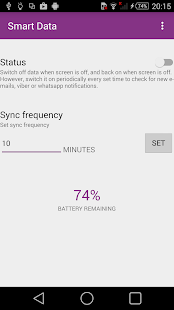
screenshot
Smart Data Battery Saver saves your battery by switching the data radio off when the phone's screen is off and switching it back on when the phone's screen is on.
This has shown a 45 % increase in battery runtime as tested by me.
BENEFITS.
1.Smart.
You know its smart cause its got Einstein's face on the launcher icon.
Smart Data Battery Saver switches the data off when the screen is off. However,you can set up a time frequency in which the data will always be turned on, and therefore you'll still receive new emails,whatsapp or viber notifications.
2.Secure.
We don't ask for weird permissions e.g. Contacts and Messages like some other apps on the market. Don't be evil!
3.Sexy.
Smart Data Battery Saver is designed with the user in mind and has implemented some of Google's Material Design guidelines.

Download here